“Alexa, open home radio” – and your own audio stream plays on Amazon Echo.
I wanted to play my own audio stream on Amazon Echo speakers around the house. That could be my own radio station, a media server or anything else on my home network that streams MP3. However, Alexa can’t just play a local address. So I worked out a way round it, using a tiny Alexa skill I wrote myself and my Synology NAS. I’ve also written the whole thing up as a free step-by-step guide on GitHub, with the skill code ready to copy.
Why an audio stream on Amazon Echo isn’t simple
When an Echo plays audio from a skill, it fetches the stream itself, straight from the address the skill gives it. However, Alexa is fussy about that address. It must be:
- HTTPS on port 443, with a properly trusted certificate (self-signed won’t do)
- reachable from the internet, not just your home Wi-Fi
- in a format it understands: MP3, AAC/MP4, HLS, PLS or M3U
Unfortunately, most home stream sources are plain HTTP on an odd port like 8000, so they fail all three tests. That’s where the Synology comes in.
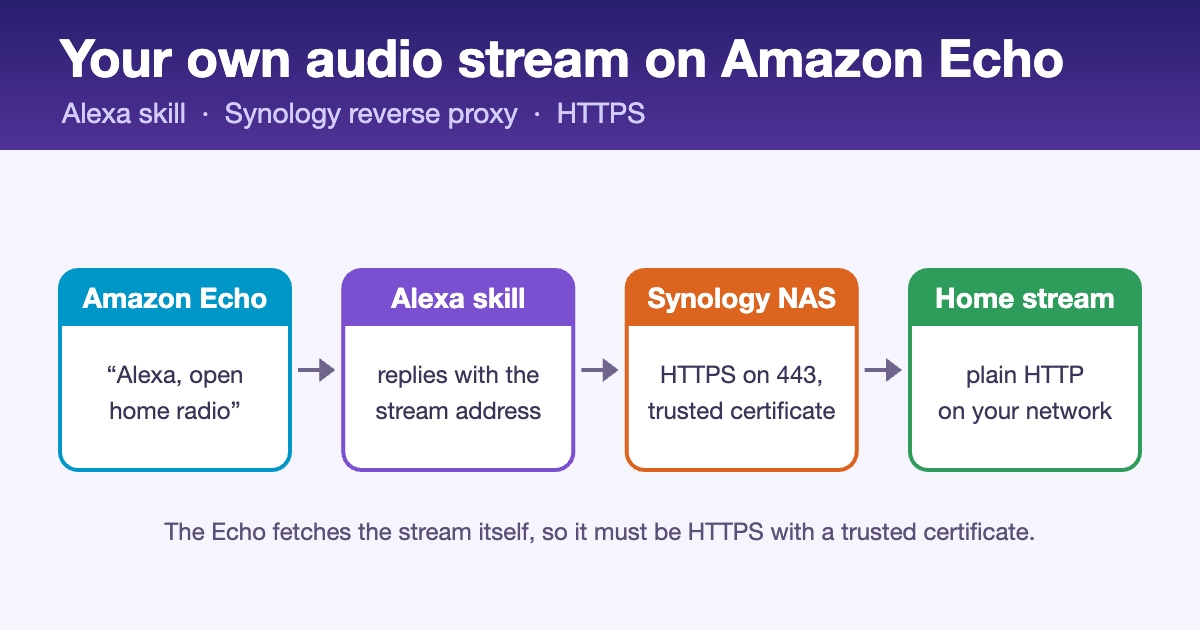
How the audio stream reaches your Amazon Echo
- You say “Alexa, open home radio”.
- Your Alexa skill replies with the stream’s secure address, e.g. https://radio.yourname.synology.me/stream?key=…
- The Echo requests that address from your Synology NAS over HTTPS (port 443, Let’s Encrypt certificate).
- The Synology’s reverse proxy fetches the audio from your stream source on the home network over plain HTTP (e.g. http://192.168.1.50:8000) and passes it back to the Echo.
- The Synology is the secure front door. A reverse proxy rule takes HTTPS requests for an address like radio.yourname.synology.me. It then passes them to the stream source on your network, using a free Let’s Encrypt certificate.
- The Alexa skill is tiny and free. As soon as you say the magic words, it simply tells the Echo to play that HTTPS address. Pause, resume and stop work too.
- It stays private. The skill runs in development mode on your own Amazon account and is never published, and the stream is protected with a secret key in the address.
What you need
- A stream on your network that already plays in VLC – MP3 at 128–192 kbps is ideal
- A Synology NAS on DSM 7 with a synology.me address (or your own domain)
- Access to your router, so you can forward ports 443 and 80 to the NAS
- A free Amazon Developer account, signed in with the same Amazon account as your Echos
The steps in brief
- Give the stream an HTTPS address – create a reverse proxy rule on the Synology and get a Let’s Encrypt certificate for it.
- Test it from outside – on your phone with Wi-Fi off, the address should show a padlock and play.
- Create the skill – an Alexa-hosted Node.js skill, with the Audio Player switched on.
- Paste in the code – the interaction model and index.js from the guide, with your stream address and station name.
- Enable testing – switch the skill to Development and it works on every Echo on your account.
The guide covers every screen in detail. It also has a troubleshooting table for the common errors. For example, the Echo might say its intro and then go silent, or a stream might work at home but not on mobile data.
Handy extras
- Say anything you like – an Alexa Routine lets “Alexa, put the radio on” open the skill.
- Play on several Echos – using a room’s Preferred Speakers, since custom skills can’t target speaker groups by voice.
- Good to know – live streams run 10–30 seconds behind. Also, a 192 kbps stream uses about 85 MB of your home upload per hour, per Echo.
Keep it personal: a development skill only works on your own account, which is exactly what you want. By contrast, publishing a skill that streams commercial music to the public would need broadcast licences (in the UK, PPL and PRS for Music).
Get the guide to your own audio stream on Amazon Echo
Everything – the full walkthrough, the skill code and the interaction model – is free on GitHub under the MIT licence: github.com/axelthefatcat/echo-home-stream.
More from Dean’s Workbench: a Ready At heat-up planner for my Balboa spa with ESPHome, and Dino’s Discogs Tagger for fixing music tags.